Convergent Gateways in Da Place - part 3
deal with inbound traffic
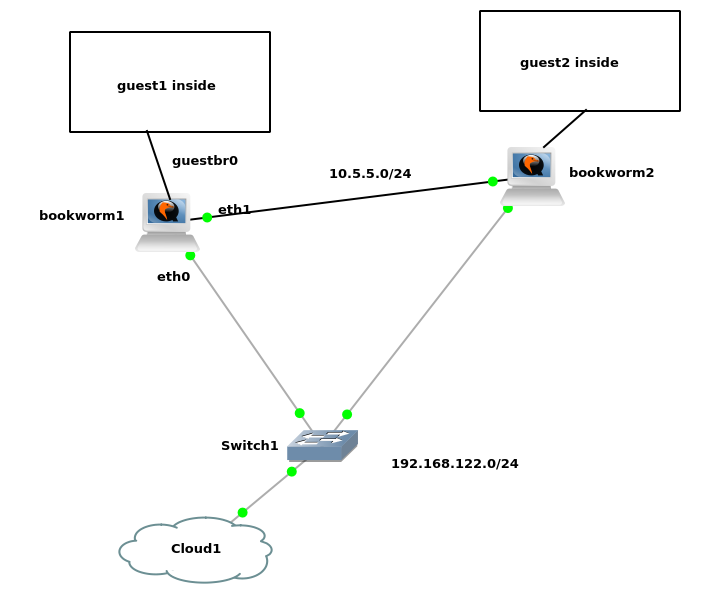
description
we now have a working poc on xen or kvm, but what about traffic flows that were inbound initiated?
assuming DNS round-robin, the client requests arrive on varying nodes, and not necessarily the one where the service lives as a guest system. the guest systems living on different nodes have differing outbound gateways, so this would obviously bring some problems (for TCP at least, and apparently even for UDP. there are three solutions for this:
FULL-NAT: we do not attempt to optimize the TCP responses' route and let those find the way back through the entering node — the one we are discussing here
CT-SYNC: we use conntrackd to synchronize the states so the answers can go right through the host gateway, just like for initiated outbound traffic in the previous pocs (but in that case, we probably need to mangle the source IP of the answer)
STATELESS-NAT: we rebuild the DNAT state based on per-node tags — this is what became part4
network requirements
we need to test a few use-cases:
- simple reverse-proxy setup e.g. for an HTTP service pointing to a precise guest system — no problem there as it is L7 with a clear segmentation on L3 (no routing required). this use-case simply helps to validate the dual-ip setup on the guest bridge (see below)
- stateful TCP connections e.g. SSH or HTTP against a precise guest system — this helps to validate FULL-NAT and CT-SYNC
- stateless but still bi-directional UDP connections e.g. NTP — which doesn’t seem to allow different return-path either
FULL-NAT
on guestbr0 we differentiate node IP (e.g. 10.1.255.251) and duplicated outbound gateway IP (10.1.255.254) – and then we do full-nat (dnat + snat) instead of simple dnat – for the outbound packet to find its route back to where the DNAT inbound connection came from (you won’t have the issue if you are using a reverse-proxy already)
the trick is to define what destination ip you want to arp filter out, instead of using the mac address – and to carefully craft a custom subnet-wide snat rule that goes along with the port-specific dnat rules
flush ruleset

table ip nat {
    # DNAT
    chain prerouting {
        type nat hook prerouting priority dstnat;

        # node1
        iif xenbr0 tcp dport 80 dnat 10.5.5.202

        # node2
        #iif xenbr0 tcp dport 80 dnat 10.5.5.201

        # shared
        iif xenbr0 tcp dport 2201 dnat 10.5.5.201:22
        iif xenbr0 tcp dport 2202 dnat 10.5.5.202:22
    }

    # SNAT
    chain postrouting {
        type nat hook postrouting priority srcnat;

        #
        # node1
        #

        # casual outbound
        ip saddr 10.5.5.0/24 oif xenbr0 snat 192.168.122.11

        # translate inbound source address (full-nat)
        ip daddr 10.5.5.0/24 oif guestbr0 snat 10.5.5.251

        #
        # node2
        #

        # casual outbound
        #ip saddr 10.5.5.0/24 oif xenbr0 snat 192.168.122.12

        # translate inbound source address (full-nat)
        #ip daddr 10.5.5.0/24 oif guestbr0 snat 10.5.5.252
    }
}

table netdev filter {
        chain egress {
                type filter hook egress devices = { eth1.100, eth2.100 } priority -500;
                arp saddr ip 10.5.5.254 drop
                arp daddr ip 10.5.5.254 drop
        }
}
guest systems
prepare two XEN guests which live resp. on two different nodes –or– for the purpose of this PoC, KVM guests w/o libvirt instead
vi /etc/network/interfaces

    auto eth0
    iface eth0 inet static
            # guest1
            address 10.5.5.201/24
            # guest2
            #address 10.5.5.202/24
            gateway 10.5.5.254
ready to go
connect to the hosts and start their respective guest systems
ssh bookworm1
ssh bookworm2
screen -S guest
guest=guest1
guest=guest2
vdisk=/data/guests/$guest/$guest.ext4
    kvm --enable-kvm -m 256 \
            -display curses -serial pty \
            -drive file=$vdisk,media=disk,if=virtio,format=raw \
            -kernel $kernel -initrd $initrd -append "ro root=/dev/vda net.ifnames=0 biosdevname=0 mitigations=off" \
            -nic bridge,br=guestbr0,model=virtio-net-pci
acceptance
http
curl -i 192.168.122.11
==> <pre>this is guest2 OK
curl -i 192.168.122.12
==> <pre>this is guest1 OK
ssh
    ssh 192.168.122.11 -p 2201 -l root
    ssh 192.168.122.12 -p 2201 -l root
==> guest1 all good
    ssh 192.168.122.11 -p 2202 -l root
    ssh 192.168.122.12 -p 2202 -l root
==> guest2 all good
Licensed as MIT